
Winning government contracts on the GeM (Government e-Marketplace) portal is a competitive process. Thousands of suppliers submit bids every day, but only a fraction of them win because they stay proactive and keep a close eye on their bid status.
Many sellers make the mistake of submitting a bid and waiting passively for results. This often leads to:
- Missed clarification requests from buyers
- Delayed responses that disqualify bids
- Missing Reverse Auction (RA) participation windows
- Unawareness of evaluation progress and award announcements
Monitoring your GeM bid status regularly helps you:
- Stay informed about every stage of evaluation
- Respond to buyer clarifications quickly
- Participate effectively in reverse auctions
- Plan inventory and logistics ahead of time
- Identify winning patterns and improve future bids
At GEMTech Paras, we’ve worked with hundreds of suppliers to track, manage, and optimize bids seamlessly. With expert assistance, you can avoid costly mistakes and improve your chances of success.
Steps to Check GeM Bid Status
Once you’ve submitted a bid on the GeM portal, the journey doesn’t end there. What truly determines your success is how effectively you track your bid status. Missing an update can cost you a contract. That’s why it’s important to understand exactly where to look and what each detail means.
Here’s a complete, seller-focused walkthrough:
Step 1: Log in to Your GeM Seller Dashboard
Head over to the GeM Portal and log in using your registered credentials. Once you’re in, you’ll land on your seller dashboard, which acts as the control center for all your tenders, bids, and catalogues.

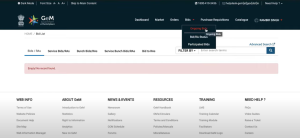
Step 2: Navigate to the “My Bids” Section
Inside your dashboard, find the “Bids” tab and click on “My Bids”.
This is your bid tracking hub, where you can:
- View all the tenders you’ve participated in
- Check their current evaluation stage
- Access documents, timelines, and buyer communications
Step 3: Use Filters for Faster Tracking
If you’re managing multiple tenders, finding a specific bid manually can be overwhelming.
Use smart filters like:
- Bid ID → to instantly locate a specific tender
- Buyer Name → to track bids from a single department
- Date Range → to monitor bids submitted within a given period
- Bid Status → to quickly check ongoing, awarded, or rejected bids

Step 4: Open Detailed Bid Insights
Clicking on the Bid ID gives you a complete snapshot of that tender:
- Submission timestamps
- Uploaded compliance documents
- Reverse Auction (RA) schedule
- Buyer clarification requests
- Real-time evaluation updates
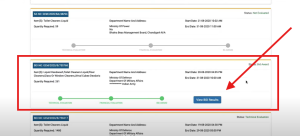
This deep view helps you stay on top of every milestone without relying on guesswork.
Pro Tip from GEMTech Paras: For sellers managing high bid volumes, we set up automated dashboards that consolidate all bid data into a single, intuitive interface no more manual tracking.
Understanding GeM Bid Status Labels
Checking your bid status is not just about where to click; it’s also about what the status actually means. On GeM, a single label determines whether you should wait, act, or escalate. Let’s decode each one carefully:
Submitted
Your bid is successfully uploaded and locked in the system. You cannot edit it now, so triple-check your details before submission.
Under Technical Evaluation
Buyers are reviewing your documents, certifications, and compliance. At this stage:
- Ensure you’re reachable via registered email and mobile.
- Watch for clarification requests missing them can cost you the bid.
Clarification Requested
Buyers may ask for supporting documents or explanations.
- You’ll see a notification inside the dashboard.
- Always respond within the deadline and keep your documents in the correct formats.
- Late or incorrect replies can automatically disqualify your bid.
Technically Qualified / Disqualified
- Technically Qualified: You’ve cleared compliance checks and moved forward.
- Technically Disqualified: Your documents or specifications didn’t match the buyer’s requirements.
Tip: GEMTech Paras reviews disqualified bids to identify gaps so you can succeed in future tenders.
Commercial Evaluation / Reverse Auction
If your bid reaches this stage, pricing becomes the key factor:
- Commercial Evaluation: Buyers compare your price with competitors.
- Reverse Auction (RA): If scheduled, you must actively participate to remain competitive.
GEMTech Paras manages RA strategy sessions to ensure you stay within winning price bands.
Awarded
Your bid has been accepted, and you’ll soon receive a Purchase Order (PO) or Work Order.
Rejected / Retendered
- Rejected: Your bid didn’t qualify, either technically or commercially.
- Retendered: The buyer reopens the tender for a fresh round of bids.
Pro Insight: Retendered opportunities often have less competition — GEMTech Paras helps clients capitalize quickly.
Timelines and Expectations: How Long Does GeM Bid Evaluation Take
One of the most common questions sellers have is:
“I’ve submitted my bid. How long before I know the result?”
The answer isn’t the same for every tender because timelines vary based on the size, complexity, and evaluation process defined by the buyer. But understanding the general flow can help you plan ahead:
Timelines and Expectations: How Long Does GeM Bid Evaluation Take
Understanding how long the GeM bid evaluation process takes helps sellers plan better and stay prepared. While there’s no fixed timeline, knowing the different stages of evaluation ensures you can respond quickly and never miss an opportunity.
1 Average Evaluation Timelines
For most standard tenders, the technical evaluation is usually completed within seven to fifteen working days. However, if the tender involves multiple items, higher quantities, or several delivery locations, the process can extend up to three to four weeks.
2 Importance of Regular Status Monitoring
During this period, it’s important to monitor your bid status on the GeM dashboard regularly. Sometimes buyers raise clarification requests, which can pause the evaluation process until you respond. Prompt replies help your bid move forward faster.
3 Technical vs Commercial Evaluation
After technical evaluation, the commercial evaluation begins. If your bid passes the technical stage, the buyer compares your pricing with competitors. For tenders without reverse auctions, this step generally takes two to five working days. However, if a reverse auction is scheduled, your bid status may remain under “Commercial Opening Scheduled” until the auction concludes.
4 Reverse Auction Timelines
Reverse auctions are highly competitive and usually last between 30 minutes to two hours. If bidders keep lowering their prices, auto-extension rules can prolong the session. Missing the auction window can result in disqualification even if your original pricing was competitive.
5 Purchase Order Generation
If you win the bid, the purchase order is typically generated within three to ten working days. You will also receive notifications via email and SMS confirming the award.
6 How GEMTech Paras Helps
At GEMTech Paras, we track every evaluation milestone for our clients and send timely alerts so sellers never miss important updates. Our structured monitoring ensures you stay ahead of deadlines and maintain a higher success rate.
Handling Buyer Clarifications on GeM Portal
Clarification requests from buyers often decide whether your bid moves forward or gets rejected. Mishandling or missing these requests is one of the most common reasons sellers lose bids. Staying alert and responding correctly is critical.
1 Where to Find Clarification Requests
Clarification requests are displayed on your GeM dashboard, and you’ll also receive notifications via email and SMS. Always keep an eye on these channels to avoid missing important updates.
2 Types of Buyer Clarifications
Buyers may ask for:
- Missing or outdated certificates
- Product specification confirmations
- Additional compliance documents
- Pricing breakdowns or mismatches
Understanding the exact requirement before responding is crucial.
3 Crafting the Perfect Response
Your reply should be accurate, concise, and consistent with your original bid data. Always upload the requested documents in the correct format and size. If digitally signed documents are required, follow the buyer’s specific instructions.
4 Importance of Deadlines
Deadlines for clarifications are usually strict — sometimes as short as 24 to 48 hours. Failing to respond within this window can automatically disqualify your bid.
5 GEMTech Paras Support
At GEMTech Paras, we manage the entire clarification process on behalf of sellers. From drafting compliant responses to submitting them well before deadlines, we ensure you never miss a critical update and improve your chances of qualification.
Tracking Reverse Auctions in Real Time
Reverse auctions play a decisive role in the GeM bidding process, especially for high-value tenders. Sellers who monitor reverse auctions in real time gain a competitive advantage and increase their chances of winning contracts.
1 Understanding Reverse Auctions on GeM
A reverse auction is a competitive bidding process where sellers continuously lower their prices until the auction closes. Buyers evaluate not just the lowest price but also factors like compliance, delivery timelines, and product quality.
2 How to Track Live Reverse Auctions
To track reverse auctions:
- Log in to your GeM dashboard.
- Go to the “My Bids” section and select the relevant Bid ID.
- Navigate to the “Reverse Auction” tab, where you can view:
- Live auction timings
- Current lowest bid value
- Auto-extension status
Monitoring this page helps you respond quickly as prices change during the auction window.
3 Strategies to Stay Competitive
- Set price limits in advance to avoid panic bidding
- Keep an eye on auto-extensions, as auctions often get prolonged when competitors keep lowering prices
- Evaluate feasibility — winning at an unsustainable price can affect profit margins
- Respond instantly to real-time updates to maintain your competitiveness
4 GEMTech Paras Advantage
At GEMTech Paras, we provide live tracking dashboards and assist sellers during reverse auctions. Our experts monitor price fluctuations, send real-time alerts, and guide you on optimal bidding strategies to maximize your chances of success.
How GEMTech Paras Helps You Stay on Top of Your Bids
Tracking and managing tenders on the GeM portal can be overwhelming, especially when you’re juggling multiple bids. That’s where GEMTech Paras comes in — our expert team simplifies the entire process and ensures you stay competitive.
End-to-End Bid Tracking
We monitor your bids daily and send you structured updates so you know exactly what stage your bid is at. No more logging in repeatedly or worrying about missing deadlines.
Real-Time Alerts and Notifications
From clarification requests to reverse auction schedules, we provide real-time alerts that keep you informed at every step. This ensures you respond quickly and improve your chances of winning.
Strategic Guidance
Our experts don’t just track bids; they analyze patterns, monitor competitor activity, and recommend strategies that make your bids stronger and more competitive.
Seamless Compliance Support
We help you prepare documents, respond to clarifications, and meet buyer-specific requirements on time, reducing the risk of rejection due to technical errors.
Focus on Growth, Not Operations
With GEMTech Paras managing the operational side of bid tracking, you can focus on preparing quality tenders, expanding your offerings, and building relationships with government buyers.
Conclusion
Checking your GeM bid status regularly is essential for success in the government marketplace. Staying proactive, responding quickly to buyer clarifications, monitoring reverse auctions, and maintaining proper documentation can significantly improve your chances of winning tenders.
However, managing multiple bids while keeping track of frequent updates can be challenging. That’s where GEMTech Paras steps in. With our end-to-end bid management support, real-time monitoring tools, and expert guidance, we help sellers stay ahead in the competitive GeM ecosystem.
If you want to simplify bid tracking and improve your success rate, get in touch with GEMTech Paras today.
FAQs on How to Check GeM Bid Status
1. How can I check my GeM bid status online?
To check your GeM bid status, log in to your GeM seller account, go to the “My Bids” section, and select the relevant Bid ID. Here, you’ll see whether your bid is submitted, under evaluation, in reverse auction, awarded, or rejected.
2. What does “Under Technical Evaluation” mean on GeM?
This status means the buyer is reviewing your submitted documents, product specifications, and compliance requirements. If your documents are accurate and meet the tender conditions, your bid will move to the commercial evaluation stage.
3. How long does GeM take to evaluate a bid?
The evaluation timeline varies depending on the complexity of the tender. For standard bids, technical evaluation usually takes 7 to 15 working days, while larger tenders with multiple items can take up to 3 to 4 weeks. Commercial evaluations and reverse auctions may add a few extra days.
4. What happens if I miss a buyer clarification request on GeM?
Missing a clarification request can lead to automatic disqualification of your bid. Always monitor your GeM dashboard, email, and SMS notifications to ensure you respond within the specified timeline, which is often just 24 to 48 hours.
5. Where can I find reverse auction details for my GeM bid?
Reverse auction details are available under your Bid ID in the “My Bids” section. You can view the auction start time, duration, current lowest bid, and auto-extension updates in real time.
6. Can I track multiple GeM bids at the same time?
Yes, you can monitor multiple bids using the “My Bids” dashboard on the GeM portal. To make the process easier, GEMTech Paras offers daily tracking dashboards and real-time alerts for all your active bids.
7. What does “Commercial Opening Scheduled” mean on GeM?
This status indicates that the technical evaluation has been completed, and the buyer is preparing to open the commercial bids. If a reverse auction is scheduled, the status will remain the same until the auction concludes.
8. Why is my GeM bid status showing as “Rejected”?
Your bid may be rejected due to several reasons, including missing documents, non-compliance with specifications, delayed clarification responses, or pricing issues. Checking the bid summary PDF can help you identify the exact reason.
9. How does GEMTech Paras help in tracking GeM bid status?
GEMTech Paras provides end-to-end bid management services. We monitor your bids, send real-time alerts for updates, manage clarification responses, track reverse auctions, and ensure you never miss critical deadlines.
10. How often should I check my GeM bid status?
Ideally, you should check your GeM bid status at least once or twice a day. However, if you manage multiple bids, using GEMTech Paras’ automated tracking tools ensures you get instant updates without manually checking each tender.